Mastering Creative Presentation Folder Design
In the world of professional branding, first impressions are rarely made by words alone. They are made by touch, by structure, and by the visual story you tell before a single page is turned. This is where the power of a truly Creative Presentation Folder Design comes into play. It’s more than just a piece of cardboard folded in half; it’s the physical embodiment of your brand’s identity, a curated package that holds your most important ideas. A well-designed folder sets the stage, builds anticipation, and communicates a level of professionalism and care that a simple document or email attachment can never achieve.
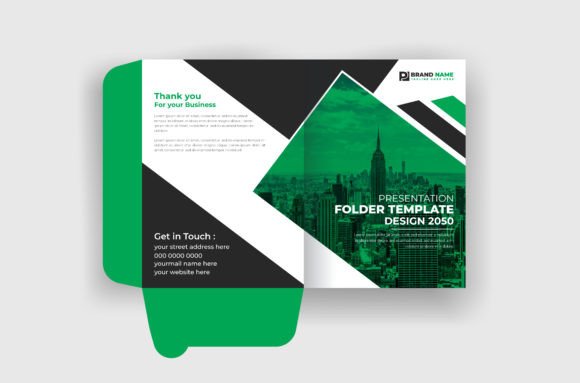
Think of it as the opening act for your main event. Whether you’re handing a client a proposal, a new hire their onboarding materials, or a conference attendee a media kit, the folder is the first object they interact with. Its weight, texture, and graphic design all contribute to a subconscious message. A flimsy, generic folder suggests a lack of investment. In contrast, a thoughtfully crafted presentation folder, built from a robust design template, signals that the contents within are valuable and that you’ve taken the time to present them in the best possible light. It’s a tactile handshake that leaves a lasting impression.
The Anatomy of a Professional Folder Template
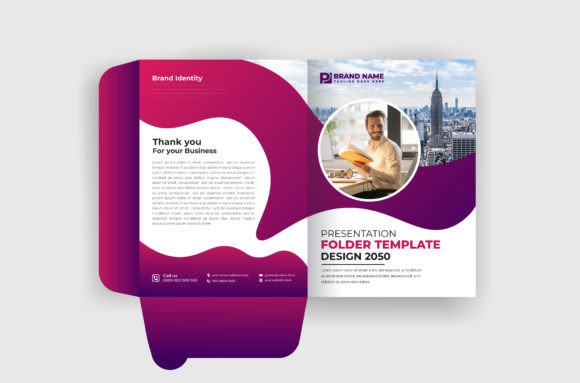
When you start with a high-quality template for your Creative Presentation Folder Design, you’re not just getting a pretty picture. You’re getting a professionally engineered blueprint. A key feature to look for is a fully editable template. This means you have complete control to change colors, swap out graphics, and adjust text to match your brand’s specific style guide. This flexibility is crucial for maintaining a consistent brand identity across all your design assets.
Furthermore, a professional template is always print ready. This is a non-negotiable for any serious project. Print-ready files are set up with the correct specifications for commercial printing, such as CMYK color profiles and a high resolution of 300Dpi. Trying to convert a low-resolution web image for print is a recipe for a blurry, unprofessional result. Using a template designed for print ensures your colors are vibrant and your lines are crisp, exactly as you intended. The fact that these files are well organized & easy to edit in programs like Adobe Illustrator (AI & EPS formats) means you can work efficiently without wrestling with a messy file structure.
From Boardroom to Mailbox: Where Your Folder Shines
The versatility of a strong presentation folder design is one of its greatest strengths. It’s a cornerstone of corporate branding, perfect for housing sales proposals, financial reports, and corporate profiles. But its utility extends far beyond the boardroom. Imagine a real estate agent presenting a property portfolio in a folder that reflects the elegance of the home itself, or a photographer handing over a wedding album in a sleeve that echoes the style of the photos inside.
Consider its applications in various fields:
- Marketing & Sales: A sleek folder containing a booklet and a leaflet detailing your services feels far more substantial than a stapled stack of papers.
- Publishing & Media: Use it as a media kit to hold press releases, author bios, and sample chapters. The design of the folder itself can reflect the genre of the book or the tone of the publication.
- Events & Conferences: A welcome packet in a branded folder is a standard for a reason. It keeps schedules, maps, and sponsor information organized and reinforces the event’s brand.
- Small Business & Freelancers: A graphic designer can use a custom folder to present a logo design package or a web design mockup. A caterer can include a menu and a contract. It elevates the entire client experience.
The key is to see the folder not as an afterthought, but as an integral part of the communication itself. The design of the cover template should give a hint of the quality and professionalism found within, creating a cohesive and memorable unboxing experience for your audience.
Practical Guidance for Your Design Process
Choosing and customizing your folder design requires a strategic approach. Start by evaluating the template’s style against your project’s goals. Is your brand modern and minimalist? Look for a design with clean lines and ample white space. Is it creative and energetic? A template with bold typography and dynamic graphic elements might be a better fit. The personality of the design should align with the personality of your brand.
Next, consider the practical details. A great design is useless if it doesn’t function well. Check the template for internal pockets—are they deep enough for a standard letter-sized document or a business card? Is there a die-cut for a business card, and is it positioned logically? These functional elements are critical for a user-friendly final product. The included vector background and graphic elements are also a huge asset. Because they are vector-based, you can scale them to any size without losing quality, ensuring your design looks sharp whether it’s on a folder or repurposed for social media graphics.
Finally, remember the human element. While the template provides the structure, your customization brings it to life. Use your brand’s color palette, place your logo with intention, and choose typography that is both on-brand and highly legible. The goal is to create a design that feels intentional and polished. When you’re finished, the result is more than just a file—it’s a powerful tool for communication. And when you share a picture of your finished project, you’re not just showing off your work; you’re inspiring other entrepreneurs, designers, and creators to think more deeply about how they present their own big ideas.