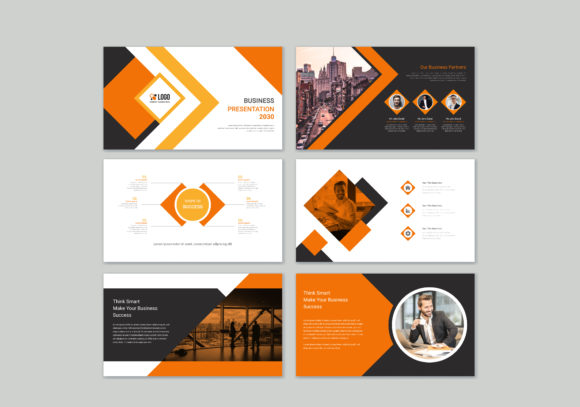
Professional Presentation Slides: A Complete Design Toolkit
In the world of client pitches and internal reports, the visual quality of your presentation speaks before you do. A cluttered or generic slide deck can undermine even the most brilliant strategy. Professional Presentation Slides offers a structured, high-impact solution. This template is built for both creative and corporate business environments, providing a polished foundation that ensures your message is taken seriously. It bridges the gap between rigid corporate layouts and overly artistic designs, offering a balanced aesthetic that fits almost any professional context.
Anatomy of a High-Impact Slide Deck
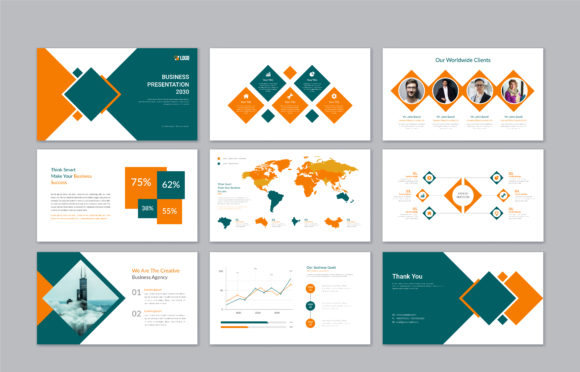
What sets this resource apart from thousands of other design assets is its construction. Created in Adobe Illustrator, this isn't just a static image file; it is a fully vector-based architecture. When you open the EPS or SVG files, you aren't just moving text boxes around. You are interacting with properly organized layers where every object, icon, and shape is editable. This level of control is vital for maintaining brand identity. You can precisely match hex codes to your brand guidelines, ensuring the color palette reinforces your company’s personality rather than clashing with it.
The visual character of the template leans toward modern typography and clean geometry. It avoids the dated "bullet point overload" style of the early 2000s. Instead, it utilizes whitespace effectively, allowing content to breathe. The included icons and graphic elements are minimal yet descriptive, helping to visualize complex data without overwhelming the viewer. Whether you choose a dark mode aesthetic for a tech pitch or a light, airy layout for a wellness brand, the 100% vector scalability ensures your graphics remain crisp on 4K monitors and printed handouts alike. The inclusion of 300 dpi JPGs also provides a quick preview option for clients who may not have the necessary software to open raw vector files.
Practical Applications Across Industries
The versatility of Professional Presentation Slides makes it a valuable asset for a wide range of users. For the entrepreneur or small business owner, this template serves as a cost-effective alternative to hiring a design agency for every pitch deck. It provides the structure needed to present a business plan to investors or a quarterly review to stakeholders. Because the file is fully editable, you can adapt a single purchase for multiple uses: a sales deck in Q1, a training manual in Q2, and a project proposal in Q3.
For marketers and content creators, the template is ideal for webinars and online courses. The clean layout aids in visual hierarchy, ensuring that key takeaways are highlighted effectively. Bloggers and publishers can repurpose slide layouts as infographics for Pinterest or Instagram, extending the life of their content. Even designers will find this useful as a starting point. Instead of building a grid system from scratch, they can import these organized layers into their workflow, saving hours of setup time while focusing on the creative customization.
Visual Hierarchy and Brand Perception
Using a structured template like this does more than just organize information; it influences how your audience perceives your competence. In editorial design and presentations, visual hierarchy dictates the order in which information is processed. This template utilizes size, weight, and placement to guide the viewer’s eye naturally from the headline to the supporting text. This reduces cognitive load, making your audience more likely to absorb the data you are presenting.
Consistency is another major factor in brand identity. When every slide shares the same design DNA—consistent margins, uniform iconography, and a cohesive color story—it builds trust. It signals that your business pays attention to detail. Conversely, a slide deck with mismatched fonts and varying alignments can suggest a lack of preparation. By utilizing the pre-set styles in this file, you ensure that your presentation aligns with the standards of modern typography, projecting an image of reliability and professionalism.
Customizing the Template for Maximum Impact
To get the most out of this asset, you need to approach the editing process with a strategy. While the template provides the canvas, the content requires your unique touch. Start by establishing your font pairing. The template is designed to accommodate various typefaces, but choosing the right combination is key. A common approach is to pair a bold, geometric sans-serif for headers with a highly readable serif or sans-serif for body text. This contrast creates a dynamic rhythm that keeps the viewer engaged.
Next, consider the imagery. The listing notes that images are not included, which is actually a benefit. It allows you to inject your own high-quality photography that reflects your specific team, products, or environment. Stock photos can often feel generic, but your own visuals add authenticity. When placing images, use the clipping masks provided in the Illustrator file to ensure they fit seamlessly into the geometric shapes of the layout. Pay attention to the logo design placement as well; ensure your brand mark is visible but not distracting, typically in the corner of the slide or on the title card.
Technical Workflow and File Management
Working with EPS and SVG files requires a basic understanding of vector software like Adobe Illustrator, Affinity Designer, or CorelDRAW. The advantage of these formats over PowerPoint files is the precision they offer. You can scale any element—from a small icon to a full-bleed background—without pixelation. This is crucial for web design integration or if you decide to print your presentation as a physical booklet.
When you download the file, take a moment to review the layer structure. A well-organized file separates text, graphics, and backgrounds into distinct layers. This makes the editing process faster and less prone to errors. If you find yourself needing to change the color scheme, use the "Select Same Fill Color" feature in Illustrator to change the hue of all similar elements simultaneously. This ensures you don't miss a stray shape that breaks the uniformity of your deck. The use of free and popular fonts within the original design also means you likely won't need to purchase additional software or licenses to match the preview look.
Ultimately, Professional Presentation Slides provides the scaffolding for effective communication. It combines the aesthetic appeal of high-end graphic design with the functional necessity of business communication. Whether you are closing a deal, teaching a concept, or pitching a creative idea, starting with a solid foundation allows you to focus on what truly matters: your message.