Showcase Your Work: The Professional Portfolio Canva Template
Putting together a portfolio that looks polished and professional can feel like a major hurdle, especially when you're focused on the actual work you do. You have the projects, the skills, and the experience, but translating that into a clean, cohesive document often requires design software you don't have or skills you haven't learned. This is where a well-designed template becomes more than just a shortcut; it's a strategic tool for personal branding.
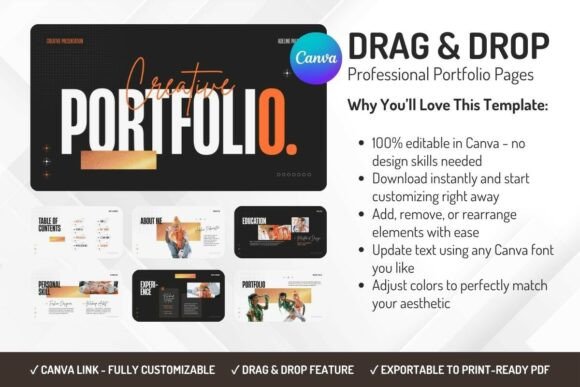
The Professional Portfolio Canva Template is built for this exact purpose. It offers a modern and minimal layout that lets your work take center stage. The visual style is clean, with ample white space, a structured grid, and a sophisticated color palette that can be easily adjusted. The personality is one of confidence and clarity—it doesn't shout for attention with flashy effects, but rather earns it through organization and visual appeal. This template understands that the portfolio is the frame, and your projects are the artwork.
Where This Template Makes the Strongest Impact
The strength of this design asset lies in its versatility across professions and industries. For a freelance graphic designer or photographer, it provides the perfect canvas to display a curated selection of projects. The clean layout ensures that images are the focal point, with text blocks neatly organized for project descriptions. For a marketing professional or business consultant, the template can structure case studies, campaign results, and client testimonials in a way that demonstrates clear value and expertise. Students entering the workforce can use it to present academic projects, internships, and skills in a format that feels professional and ready for a job interview.
Beyond traditional portfolios, this Canva template adapts seamlessly to various creative and commercial needs. It functions beautifully as a digital presentation for client proposals, a printed leave-behind after a meeting, or a downloadable PDF on your personal website. The design is inherently web-friendly, with layouts that consider readability on screens, but it also carries enough sophistication for high-quality print. Its modern typography choices, which you can customize, contribute to a brand identity that feels current and intentional, whether you're in editorial design, web design, or even showcasing packaging design samples.
Shaping Perception and Ensuring Readability
A portfolio's design directly influences how your professionalism is perceived. A cluttered or outdated layout can inadvertently suggest a lack of attention to detail. This template's structured hierarchy guides the viewer's eye naturally from your name and title to your featured projects and contact information. The visual hierarchy is established through consistent use of headings, subheadings, and body text, creating a smooth reading experience. This isn't just about looking good; it's about communicating efficiently.
When you customize the template in Canva, you're engaging in a core aspect of brand strategy. The color scheme you choose should align with your personal or business brand identity. The fonts you select—perhaps pairing a clean sans serif font for body text with a complementary display font for headings—should reflect the tone of your work. A creative in a more traditional field might opt for a classic serif font, while a tech entrepreneur might stick with a modern sans serif. The template provides a solid foundation, but these choices allow you to inject your unique personality, ensuring your portfolio feels authentically yours and resonates with your specific audience.
Practical Steps for Customization and Use
Getting started is straightforward. After downloading, you open the file in Canva with a free account. The drag-and-drop interface means you don't need any technical expertise. You can change the placeholder text with your own content, swap out images for your project screenshots or photos, and adjust colors using the hex codes from your brand palette. Pay close attention to the included styles—the template likely offers multiple page layouts for different content types like project spreads, testimonials, and skills pages. Use these variations to keep the document engaging from start to finish.
As you edit, keep readability at the forefront. Ensure there is sufficient contrast between text and background colors. Check that font sizes are comfortable for reading, especially in longer project descriptions. If you're preparing the portfolio for print, review the layout in a print preview to check margins and bleed. The beauty of this digital asset is the ability to iterate quickly. You can create multiple versions tailored for different audiences—a more creatively focused one for design clients and a more results-oriented one for corporate proposals.
Ultimately, the Professional Portfolio Canva Template is about removing the friction between you and a powerful professional presentation. It handles the design heavy lifting, allowing you to focus on curating and articulating your story. By providing a clean, modern, and fully editable framework, it empowers you to build a portfolio that not only showcases your achievements but also reinforces your credibility and attention to quality from the very first glance.