Less is More: Mastering Minimal Design with Architecture Portfolio Template V2
In the world of architecture and design, your work speaks louder than any decorative element ever could. Yet, the way you present that work—how it’s framed, organized, and styled—can either amplify its impact or distract from it. This is the core philosophy behind the Architecture Portfolio Template V2. It’s built on the principle that a clean, uncluttered canvas allows your projects to take center stage, free from competing visual noise. The result is a portfolio that feels confident, professional, and timeless.
The Power of a Grayscale Foundation
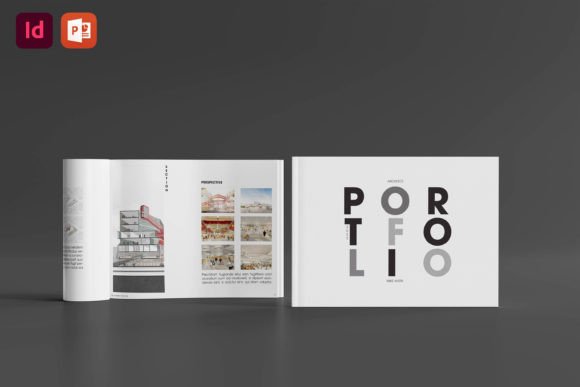
At first glance, the template’s most defining feature is its deliberate use of a grayscale theme. This isn’t a limitation; it’s a strategic choice. By removing color, the design forces the viewer’s attention directly to the form, texture, and spatial qualities of your architectural work, photography, or other visual projects. It creates a sophisticated, gallery-like atmosphere where every line drawing, render, and photograph is presented with stark clarity. The template understands that sometimes, the most powerful statement is made through restraint.
That said, the grayscale theme is a starting point, not a final destination. The template is designed with flexibility in mind. If your brand identity or project narrative calls for it, you can easily adapt the color palette. The underlying grid-based layout and master pages are built to support any color scheme, allowing you to transform the portfolio into a vibrant, color-driven presentation or maintain the elegant monochrome. The structure ensures that whether in color or in black and white, the layout remains balanced, readable, and visually stunning.
Designed for Real-World Use: Practicality Meets Polish
A beautiful template is useless if it’s difficult to edit. The Architecture Portfolio Template V2 is built for practicality. Included as both an Adobe InDesign (.idml) and a PowerPoint (.pptx) file, it meets designers where they already work. The grid-based layout isn’t just for show—it’s a functional tool that ensures consistency across all pages, making it faster to add new projects while maintaining professional alignment. Master pages handle recurring elements like headers, footers, and page numbers, so you can update your entire document in seconds.
The template’s A4 size (297x210mm) is a versatile standard for both digital sharing and professional printing. Whether you’re emailing a PDF to a potential client, presenting on screen, or producing a high-quality printed book, the dimensions are optimized for readability and impact. The included instruction file and font download link remove guesswork, guiding you through setup so you can focus on curating your content, not troubleshooting technical details.
Who Benefits from This Approach to Portfolio Design?
This template is a versatile design asset that extends beyond architecture. Its minimalist, modern typography and clean structure make it ideal for a wide range of professionals. Photographers can create lookbooks that let their images breathe. Graphic designers can present branding and editorial design projects with clarity. Marketers and entrepreneurs can build polished presentations or brochures that communicate professionalism. Even hobbyists and crafters can use it to showcase their work in a sophisticated, organized manner.
The grayscale theme, in particular, is excellent for projects where the work itself is the hero. If your portfolio features detailed technical drawings, intricate models, or nuanced black-and-white photography, this template ensures they are displayed without distraction. It helps build a brand identity that values precision, elegance, and focus—qualities that resonate with clients looking for thoughtful, expert-level work.
Making the Template Your Own: Practical Considerations
When integrating the Architecture Portfolio Template V2 into your workflow, start by reviewing the included example layout PDF. It provides a clear vision of how the grids, margins, and typography work together. Think about your content: How many projects will you feature? What is the visual weight of your imagery? The template’s flexible grid can accommodate dense technical portfolios and spacious image-driven presentations alike.
While the template provides a strong typographic foundation, consider how its clean, sans-serif style pairs with your existing brand elements. The included font is chosen for its readability and modern appeal, but you can test pairings with a serif font for headings or a script font for accent text to add a unique touch. Always prioritize readability, especially for body text and project descriptions. Test the final PDF on different screens and in print to ensure details remain sharp and legible.
Remember, the goal is not to let the template dictate your style, but to use it as a scaffold that elevates your unique work. Its strength lies in its ability to disappear, allowing your projects to tell their own story. In a world saturated with cluttered designs, choosing a minimalist, well-structured portfolio template is a powerful statement of confidence and professionalism. It shows you trust your work enough to let it stand on its own.