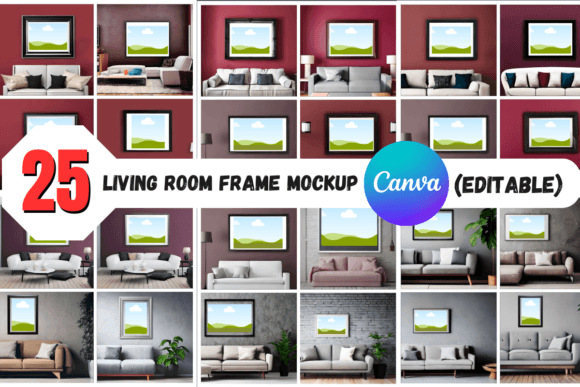
Living Room Frame Mockups: A Canva Designer’s Guide
Why High-Quality Visuals Matter More Than Ever
Let's be honest: simply creating a design isn't enough. In a world saturated with content, how you present your work can be just as important as the work itself. A stunning illustration or a powerful photograph loses its impact when shown on a blank white background. It lacks context, scale, and that tangible, real-world quality that makes people stop scrolling. This is where the right mockup becomes an indispensable part of your creative toolkit, transforming a flat digital file into a compelling, shareable vision.
The challenge, however, is twofold. First, finding high-quality mockups that don't look generic or overly staged. Second, the technical hurdle of using them. Many designers and creators aren't fluent in complex software like Photoshop, and even those who are can find the process of editing smart objects and adjusting layers time-consuming. This is precisely the problem the 25 Living Room Frame Mockup - Canva Edit collection was designed to solve. It’s a bridge between a great idea and a professional presentation, built entirely within the accessible Canva ecosystem.
Unpacking the 25 Living Room Frame Mockup Collection
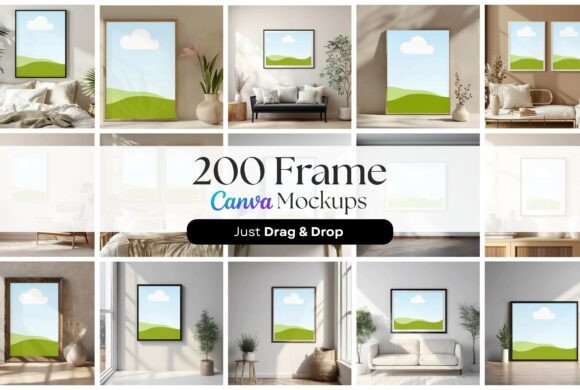
At its core, this product is a curated set of 25 distinct digital templates. Each template features a realistic living room scene with one or more photo frames, ready for you to insert your own artwork. The visual personality is intentionally versatile. You won’t find a single, monotonous style. Instead, the collection spans a range of interior design aesthetics—from minimalist and Scandinavian to mid-century modern and cozy eclectic. One mockup might feature a sleek, black frame against a clean, white wall with a fiddle-leaf fig in the corner. Another could present a warm, oak-toned frame on a textured, earthy wall beside a stack of books.
This variety is its greatest strength. It means the 25 Living Room Frame Mockup set isn’t just for one type of artist. A photographer specializing in black-and-white portraits can find a moody, gallery-style setting. A watercolor artist can choose a scene with soft lighting and natural textures that complement their medium. A graphic designer showcasing a bold, typographic print can select a modern, high-contrast environment. The high-resolution 5000x5000 pixel quality ensures your final image is crisp and detailed, perfect for everything from a website hero banner to a large-format print in a portfolio.
Practical Applications: From Portfolio to Product Page
So, where does this collection truly shine? Its utility extends far beyond just making something look "nice." Let's break down the real-world value for different creative professionals.
For artists and photographers, these mockups are a game-changer for online portfolios and sales listings. Instead of a simple grid of images, you can show a piece "in situ." This helps potential buyers visualize the art in their own home, which is a powerful psychological trigger for making a purchase. It answers the unspoken question, "How big is this, really?" and "Will this style match my couch?"
Graphic designers and brand strategists can leverage them to present client work with greater impact. Imagine showing a client a brand identity system where the logo is elegantly framed in a living room mockup, demonstrating how it could appear in a real-world retail space or as part of office decor. It elevates a presentation from a simple PDF of logos to a vision of the brand's potential. This is about building a brand identity that feels lived-in and authentic.
For marketers, bloggers, and content creators, the applications are equally rich. A blogger could use a mockup to feature a printable recipe card or a motivational quote graphic, making a social media post more engaging than a plain image. An e-commerce store selling digital downloads—like planners, wall art, or greeting cards—can create far more attractive and effective product listing images. This is a core component of modern web design and social media graphics—showing the product in a desirable context.
A Designer's Guide to Using the Canva Mockups
The true beauty of the 25 Living Room Frame Mockup - Canva Edit system lies in its simplicity. You don’t need to be a Canva power user to get professional results. The process is straightforward: you open the template, find the placeholder for your image, and use Canva’s "Uploads" or "Photos" feature to drag and drop your artwork directly into the frame. The perspective, lighting, and shadows are already baked into the template, so your art automatically looks like it’s part of the scene.
Here are a few practical tips to get the most out of them:
- Consider the Context: Don't just pick the prettiest room. Think about your artwork's personality. A bold, abstract piece might pop in a minimalist setting, while a delicate floral print could feel at home in a softer, more traditional room.
- Play with Groupings: Some templates feature multiple frames. Use these to showcase a series of works or to create a dynamic gallery wall presentation for a client. It shows you understand visual hierarchy and composition.
- Match the Mood for Branding: If you're building a brand identity for a client, choose mockup scenes that align with their brand's aesthetic. A luxury brand might use a mockup with elegant furniture and soft lighting, while a youthful, energetic brand might work best in a bright, contemporary space.
- Think Beyond the Obvious: While they are "living room" mockups, the framed art can represent more than just wall decor. Use them to display a book cover concept, a movie poster design, or even a screenshot of a website design, framing it as a piece of "digital art" in a physical space.
This collection isn't about replacing deep design knowledge; it's about augmenting your workflow. It removes the technical barrier to high-end presentation, allowing you to focus on what you do best: creating. By providing a versatile and professional set of design assets, the 25 Living Room Frame Mockup